
Lensa: photo editor & AI art
Prisma Labs, Inc.Photography
4.19.34K Reviews
- Version
- 6.3.7+882
- Installs
- 10.00M
- Age Rating
- Everyone
Screenshots
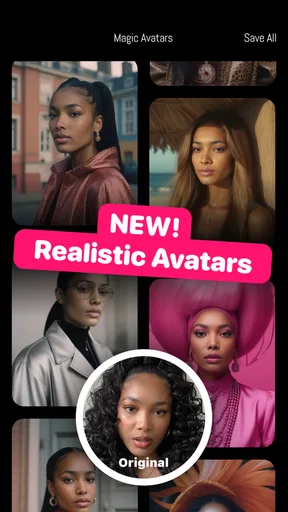
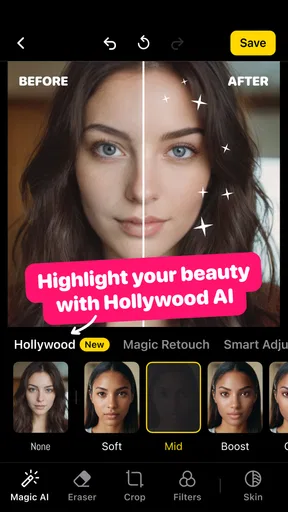
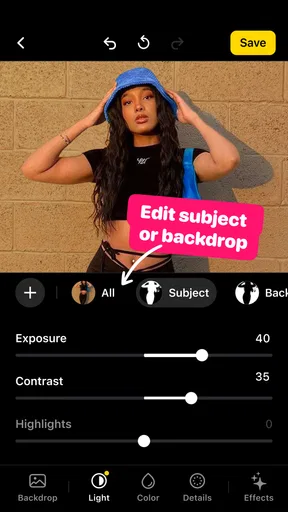
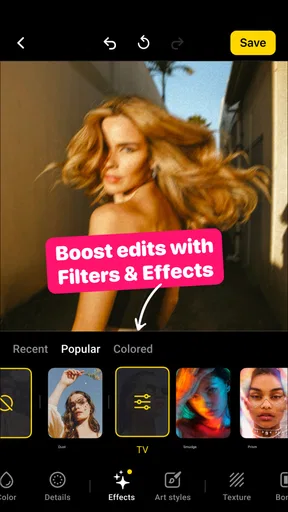
Our Review of Lensa: photo editor & AI art
 Analysis by Appyee
When I’m deciding whether to try a photo editor, I care less about how many effects it advertises and more about whether it can make a picture look better without turning it into someone else’s face. Lensa is aimed at portraits and selfies, with AI enhancement and artistic transformations at its center. That focus makes it appealing if people photos are what you edit most, but it also means it is not automatically the best choice for every photography task.
I’d judge it by three practical questions: Do I want a quick portrait touch-up, do I enjoy AI-generated interpretations of pictures, and am I comfortable with the app’s paid options? If the first two sound useful, it is worth exploring. If I mainly need detailed control over landscapes, product shots, or a large batch of varied photos, a more traditional editing workflow may suit me better.
Who will get the most out of it
The best fit is someone who regularly takes selfies or portraits and wants a more polished result without learning a complicated desktop-style editor. I can see it being useful for a profile picture, a family snapshot, or a casual portrait that needs a little help before sharing. Its emphasis on faces gives the app a clearer purpose than a general collection of unrelated photo effects.
It is also a natural choice for people who treat editing as play as much as correction. The AI art and avatar-making angle invites experimentation: a familiar portrait can become something stylized rather than simply brighter or sharper. That is a different goal from faithfully documenting a scene, and the distinction matters. I would use an artistic result when I want a distinctive social image, not when I need a neutral photograph that represents a person or event accurately.
A useful way to test an edit
My practical advice is to begin with a photo that has clear, even lighting and a face that is not hidden by heavy shadows or an awkward crop. That gives an enhancer a fair starting point and makes it easier to notice whether the result still looks like the person. Before saving or sharing, compare the edited image with the original at the same size. Small changes can look convincing when viewed close up but feel too strong once the picture is used as a profile image.
For a more deliberate workflow, I would keep an untouched copy of the original and make one kind of change at a time. Try a straightforward enhancement before leaning into a stylized treatment; if the image already looks good after the basic pass, there may be no reason to push it further. This is especially helpful for portraits of friends and family, where a smooth, recognizable result is often more useful than a dramatic transformation.
Where it sits among photo editors
Compared with a conventional editor built around manual sliders and precise adjustments, Lensa’s appeal is speed and portrait-focused processing. A manual tool is often a better fit when I want to control each tonal change, preserve a particular color balance, or work through a landscape with no face as the main subject. In Lensa, the more interesting decision is often whether I want an AI-assisted portrait finish or an artistic reinterpretation.
Against simple filter apps, the distinction is the emphasis on AI portrait enhancement and avatar-style creativity rather than just applying one uniform look over an image. That can save time when I want a face-focused result, but it also makes personal judgement important: automated edits do not know whether I prefer a natural expression, visible skin texture, or a more polished style. I would treat any one-tap result as a starting point, not an instruction to accept every change.
For someone who mostly adjusts exposure, crops images, and organizes everyday camera photos, the built-in tools on a phone may already cover the essentials. Lensa becomes more compelling when portrait editing or creative AI treatments are the reason for opening an app in the first place. Choosing it for that specific job is more sensible than expecting it to replace every editing tool.
What to consider before making it part of a routine
Lensa is free to download, with in-app purchases ranging from under a dollar to prices reaching the upper end of the listed range. I would check the current purchase details in the app before relying on a particular feature or committing to a paid option. The cost can make sense if I use its portrait tools often, but occasional editors may prefer to stick with free basics or pay only when a specific creative need comes up.
That distinction also answers a common practical question: does trying the app mean paying immediately? The app itself is free, while some purchases are available inside it. I would explore what is accessible in my own version before assuming that every tool or result is included at no cost. If I only need a one-off profile picture, I would first see whether the free experience is enough rather than treating a paid plan as essential.
There is a style trade-off, too. Portrait enhancement can make a quick selfie feel more finished, but stronger processing may reduce the small details that make a face look individual. Artistic transformations are intentionally less faithful, so they are better suited to playful images than formal records. If authenticity is the priority—such as a work profile where the photo should closely match how I look—I would use a restrained approach or choose a basic editor with more direct control.
A realistic everyday test
Imagine I take a quick selfie before meeting friends and want a usable picture for a group chat or social profile. I would pick the clearest frame, use a restrained enhancement, and check that the result still resembles me in ordinary lighting. If I want something more distinctive, I could then try an artistic direction on a separate copy. Keeping those goals separate avoids ending up with a heavily stylized image when all I needed was a clear portrait.
The same approach works for a family photo: start with the image that already has the best expression, not the one with the most obvious flaw. A tool can help with presentation, but it cannot change a closed-eye moment into a natural expression or make a badly composed group portrait ideal. For a photo where everyone needs to look like themselves, I would compare the finished result with the original before sharing it.
One non-obvious advantage of keeping enhancement and creative transformation as separate steps is that it gives me a choice about how the image will be used. A subtle portrait can work for a profile, while an imaginative version may be fun for a message or personal project. Saving the original makes that choice reversible; I can return to the less processed image instead of treating one dramatic edit as the only version worth keeping.
A Whole New World of Editing
When I first opened Lensa, I was greeted by a sleek, intuitive interface that immediately made me feel like an editing pro. No unnecessary clutter here, just straightforward tools ready to transform my photos. The app promises to make your selfies look magazine-ready, and I was eager to put it to the test.
AI Magic at Your Fingertips
One of the standout features of Lensa is its AI-powered editing tool. It’s almost like having a digital makeup artist who knows exactly what you need. The AI automatically enhances your photo by adjusting lighting, color balance, and even removing blemishes. I was genuinely impressed by how natural the edits looked—no over-the-top filters that make your skin appear plastic. It’s like having your best skin day every day!
But wait, there’s more! The AI doesn’t stop at basic enhancements. It can also transform your pics into artistic masterpieces with its AI Art feature. Just a few taps and voilà, your photo is now a piece of art worthy of a gallery wall.
Editing Tools Galore
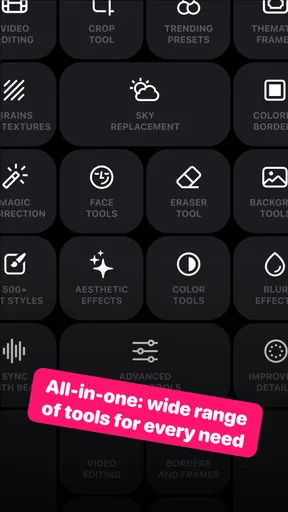
Beyond AI, Lensa packs a punch with its array of editing tools. From basic adjustments like brightness and contrast to more advanced features like lens correction and background adjustment, there’s something for everyone. I particularly loved the face retouch option. It allows you to tweak facial features subtly, perfect for those days when you need a little extra help.
The app also offers a magic correction tool that fixes any imperfections with just one tap. It’s perfect for those quick edits when you’re on the go and need to post that perfect selfie ASAP.
User Experience and Navigation
Now, let’s talk about the user experience. I found Lensa incredibly easy to navigate. Each tool is clearly labeled, and the app provides helpful tips to guide you through the editing process. Even if you’re a newbie to photo editing, Lensa makes it feel like a breeze.
The app runs smoothly on both Android and iOS, which is a major plus for me. There’s nothing worse than an app crashing in the middle of an edit, but with Lensa, I had no such issues.
For readers choosing between phone platforms, the key point is that Lensa is available in the Android and iOS app ecosystems; the experience on a particular device can still depend on that device and its software. Android users should check that their operating system meets the app’s minimum requirement, which is version 10. The current release is 6.2.5+855, so I would keep the app updated if I were troubleshooting a tool that behaves differently than expected.
The app comes from Prisma Labs, Inc. and is rated for Everyone, which makes it broadly accessible as a photo editor. That rating is not a recommendation to share every edited image publicly; I would still use ordinary judgement when choosing portraits of children, friends, or anyone who has not agreed to have a picture posted. For personal photos, the most useful habit is to decide where an image will go before applying a strong transformation.
Subscription and Pricing
While Lensa offers a free version, to access all its features, you’ll need a subscription. The premium version unlocks more advanced tools and gives you the full power of the AI enhancements. While some might balk at the idea of paying for an app, I found the price reasonable, especially given the quality of edits you get.
They do offer a free trial, so you can take it for a spin before committing. I’d highly recommend giving it a try to see if it suits your needs.
Because costs and access can change by purchase choice, I would not make a decision based on an assumed subscription arrangement or trial. The confirmed point is simpler: downloading is free, and optional in-app purchases are offered. Before buying anything, I would look at the exact terms shown at checkout and ask myself how often I would use the paid capability. A frequent portrait editor may value a faster, more flexible workflow; someone editing a handful of pictures may find that the free access or their phone’s standard editor is enough.
There is also a modest switching cost that has nothing to do with money: learning which kind of result suits me. If I move from a basic filter app, I may need a few tries to settle on a natural level of retouching rather than choosing the most noticeable effect. If I move from a manual editor, I may miss the feeling of adjusting every detail myself. I would test it on a few different portraits before deciding whether its approach fits my habits.
The app has a substantial audience, with more than 10 million installs, an average rating of 4.1 from around 195,000 ratings, and about 9,300 written reviews. I see those figures as context rather than proof that it will suit my taste: portrait style is personal, and a high level of popularity cannot tell me whether I prefer subtle edits or a more imaginative look. A short, hands-on test with photos I actually care about is more informative than popularity alone.
Who should choose something else
I would skip Lensa if my main goal is precise, repeatable color work across many kinds of images, or if I strongly prefer to make every adjustment manually. A dedicated editor organized around detailed controls is likely a better match for that workflow. I would also choose a simpler option if I only need to crop a photo or make a quick brightness adjustment; installing a portrait-focused app for an occasional basic correction may add an unnecessary step.
It may not be right for anyone who dislikes AI-generated interpretations or feels uncomfortable with facial retouching. In that case, a standard camera editor can be a better fit because its purpose is straightforward correction rather than turning a portrait into an artistic variation. The right choice depends on whether I want Lensa’s particular portrait-centered approach, not on whether AI editing is fashionable.
My recommendation for portrait-focused editing
Lensa is a worthwhile option if I want a convenient place to enhance portraits and experiment with AI-driven creative results. I would recommend it most to selfie-takers, social-media users, and anyone who enjoys trying different treatments on a familiar face. Its strongest reason to be on my phone is that focused combination of portrait editing and playful transformation, not a promise to replace every photo tool I use.
My recommendation comes with a simple boundary: keep a copy of the original, inspect edits at normal viewing size, and check purchase terms before paying. If I want a natural-looking portrait, I would use a light touch; if I want an avatar or artistic image, I would treat the result as creative expression rather than a faithful photograph. With those expectations, Lensa is an easy app to consider. If manual precision or broad editing flexibility matters more, I would look elsewhere instead.
Verdict
Strengths of Lensa: photo editor & AI art
- Intuitive and user-friendly interface.
- Wide variety of editing tools.
- AI-enhanced photo editing.
- Regular updates with new features.
- Supports high-resolution exports.
Limitations of Lensa: photo editor & AI art
- Some features require a subscription.
- Occasional lag with larger files.
- Limited free version capabilities.
- In-app ads can be intrusive.
- AI art might not suit all tastes.
Other Releases by Prisma Labs, Inc.
View All
Prisma Art Effect Photo Editor
Photography4.5
Similar Picks in This Category
View All
Google Photos
Google LLC4.4

Gallery
Google LLC4.2

Picsart AI Photo Editor, Video
PicsArt, Inc.3.9

B612 AI Photo&Video Editor
SNOW Corporation4.1

BeautyPlus-Selfie Photo Editor
PIXOCIAL TECHNOLOGY (SINGAPORE) PTE. LTD.4.5

Remini - AI Photo Enhancer
Bending Spoons4.1
Frequently Asked Questions
What is Lensa and how does it enhance my photos?
Lensa is a powerful photo editing app that uses AI technology to enhance and retouch your photos. It offers features like background blurring, skin smoothing, and color correction. The AI art feature allows you to transform your images into artistic creations, providing both novice and advanced users with professional-quality edits.
Is Lensa free to use, or does it require a subscription?
Lensa offers a free version with limited features, but to unlock its full potential, a subscription is required. The paid version provides access to advanced editing tools and AI art features, along with regular updates and improvements. Users can choose from various subscription plans to suit their needs.
How does Lensa's AI art feature work?
Lensa's AI art feature utilizes advanced artificial intelligence algorithms to transform your photos into artistic styles. Users can choose from a variety of art filters that mimic different art movements or styles. The AI analyzes the image and applies the filter seamlessly, offering a unique and creative touch to your photos.
Can Lensa be used for professional photo editing?
Yes, Lensa can be used for professional photo editing. The app provides a range of tools that cater to both casual users and professionals. With features like precise retouching, color correction, and advanced AI enhancements, photographers can achieve high-quality results suitable for professional portfolios and social media.
What devices are compatible with Lensa?
Lensa is available on both Android and iOS devices. It supports a wide range of smartphones and tablets, ensuring that most users can access its features. However, for optimal performance, it is recommended to use the app on devices running the latest operating system versions and with sufficient processing power.
